Showing posts with label Tech. Show all posts
1 comments Sunday, April 04, 2010

The way internet has barged into our lives, we have been seeing the world in a very new way.
I stumbled on this image created by Byte Level research LLC which shows the new world


As per Byte Level
Each ccTLD is sized relative to the population of the country or territory, with the exception of China and India, which were restrained by 30% to fit the layout. At the other end of the spectrum, the smallest type size used reflects those countries with fewer than 10 million residents.


[click image to enlarge]

0 comments Tuesday, September 22, 2009

If you want to know the order in which Windows drivers are loaded during boot up you can see that. I'm not sure why would you like to know that but if you have time to kill you can try this.

C:\> wmic loadorder list full

The output will look something like this


DriverEnabled GroupOrder Name Status
TRUE 1 System Reserved OK
TRUE 2 Boot Bus Extender OK
TRUE 3 System Bus Extender OK
TRUE 4 SCSI miniport OK
TRUE 5 Port OK
TRUE 6 Primary Disk OK
TRUE 7 SCSI Class OK
TRUE 8 SCSI CDROM Class OK
TRUE 9 FSFilter Infrastructure OK
TRUE 10 FSFilter System OK
TRUE 11 FSFilter Bottom OK
TRUE 12 FSFilter Copy Protection OK
TRUE 13 FSFilter Security Enhancer OK
TRUE 14 FSFilter Open File OK
TRUE 15 FSFilter Physical Quota Management OK
TRUE 16 FSFilter Encryption OK
TRUE 17 FSFilter Compression OK
TRUE 18 FSFilter HSM OK
TRUE 19 FSFilter Cluster File System OK
TRUE 20 FSFilter System Recovery OK
TRUE 21 FSFilter Quota Management OK
TRUE 22 FSFilter Content Screener OK
TRUE 23 FSFilter Continuous Backup OK
TRUE 24 FSFilter Replication OK
TRUE 25 FSFilter Anti-Virus OK
TRUE 26 FSFilter Undelete OK
TRUE 27 FSFilter Activity Monitor OK
TRUE 28 FSFilter Top OK
TRUE 29 Filter OK
TRUE 30 Boot File System OK
TRUE 31 Base OK
TRUE 32 Pointer Port OK
TRUE 33 Keyboard Port OK
TRUE 34 Pointer Class OK
TRUE 35 Keyboard Class OK
TRUE 36 Video Init OK
TRUE 37 Video OK
TRUE 38 Video Save OK
TRUE 39 File System OK
TRUE 40 Event Log OK
TRUE 41 Streams Drivers OK
TRUE 42 NDIS Wrapper OK
TRUE 43 COM Infrastructure OK
TRUE 44 UIGroup OK
TRUE 45 LocalValidation OK
TRUE 46 PlugPlay OK
TRUE 47 PNP_TDI OK
TRUE 48 NDIS OK
TRUE 49 TDI OK
TRUE 50 NetBIOSGroup OK
TRUE 51 ShellSvcGroup OK
TRUE 52 SchedulerGroup OK
TRUE 53 SpoolerGroup OK
TRUE 54 AudioGroup OK
TRUE 55 SmartCardGroup OK
TRUE 56 NetworkProvider OK
TRUE 57 RemoteValidation OK
TRUE 58 NetDDEGroup OK
TRUE 59 Parallel arbitrator OK
TRUE 60 Extended Base OK
TRUE 61 PCI Configuration OK
TRUE 62 MS Transactions OK
FALSE 63 Network OK
FALSE 64 Pnp Filter OK
FALSE 65 MMC OK
FALSE 66 MemoryStick OK
FALSE 67 SmartMedia/XD OK
FALSE 68 ExtendedBase OK
FALSE 69 WdfLoadGroup OK

This will show you the order in which drivers are loaded on your windows box.


Note to self: stop posting if see that you haven't posted anything since long ;)

3 comments Tuesday, January 13, 2009

Here is a bunch of CheatSheets which might be useful from time to time to use as a reference:
# TCP/IP and tcpdump Cheat Sheet - SANS.org
# Google Hacking and Defense Cheat Sheet - SANS.org
# Intrusion Discovery Cheat Sheet Windows - SANS.org
# Intrusion Discovery Cheat Sheet Linux - SANS.org
# SQL Injection Cheat Sheet - ha.ckers.org
# Cross Site Scripting Cheat Sheet - ha.ckers.org
# Web application Cheat Sheet - secguru.com
# Linux Security Quick Reference Guide - Linuxsecurity.com
# LINUX Administrator’s Quick Reference Card - cheat-sheets.org
# Oracle Security Cheat Sheet - red-database-security.com
# Nmap & Nessus Cheat Sheet - secguru.com
# Security Incident Survey Cheat Sheet - zeltser.com
# Initial Security Incident Questionnaire for Responder - zeltser.com
# BGP, EIGRP, First Hop Redundancy, 802.1X, IPsec, IPv4 Multicast, IPv6, IS-IS, OSPF , STP, tcpdump, Wireshark, Common Ports, IP Access Lists, Subnetting, Markdown, MediaWiki, MPLS,QoS, VLANs, Cisco IOS, Physical Terminations Cheat Sheets - packetlife.net

If you have more, post them in comments & I'll update the list :)

1 comments Tuesday, December 23, 2008

Following HDMoore's twit I stumbled on this case of Man-in-the-middle attack with a valid SSL certificate from a shady reseller.

Eddy Nigg was able to buy a certificate in the name of mozilla.com from a reseller of comodo named 'Certstar'.

In response of this issue, comodo says

That reseller's ability to sell Comodo certificates has been suspended while we
investigate why they are apparently not fulfilling their contractual obligations
to us. We revoked your certificate for mozilla.com.

If this is the situation, why do an attacker need to work hard to do arp poisoning and other tricks to do an MITM. Phishers will be happy to use this kind of shady resellers.

Or maybe they are already using these kind of stupid CAs to get a valid certificates.

Call me crazy/paranoid /fanatic or whatever you want to but I've deleted COMODO from both of my browsers (IE & FF). Chrome uses the same from IE so it became easy for me ;)


This is indeed scary, very scary...


0 comments Thursday, December 04, 2008

I found this tiny(absolute tiny) and wonderful utility for windows mobile.

It uses top 2 pixel row of your screen and shows you the battery as well as memory status. A quick look at the phone will give you an idea that how much battery is remaining and if you have enough memory free or not.

See the top 2 pixel of the screenshot

See the top 2 pixel of the screenshot

Name: powerstatus.exe
Size: 3584 bytes
License: Freeware
Download: http://freewareppc.com/utilities/powerstatus.shtml

Put this in your windows mobile startup and have fun. I'm loving it :)

0 comments

One day to go for the India's second hackers' convention


Date: 6th & 7th December 2008
Place: Pune
Venue: International Convention Center, SB Road. Address
Schedule: Schedule
Registration: Registration

0 comments Friday, November 21, 2008

On 10th November 2008, ClubHack with support of Cyber Crime Cell of Pune Police conducted a Wardriving in Pune, Maharashtra.


This Wardriving aimed at analysis of wireless network security in Pune city at common places like ITparks, residential areas, market areas, hotels, airport etc.


To our amaze, we found nearly 81% of Pune's wifi to be insecure ( I count WEP as insecure)


Find the report and analysis @ http://wardrive.in/

0 comments Friday, November 07, 2008

Ever wondered what is this “Free Public WiFi” or “Free Internet Access” wireless network visible in most of the places?
These are known as Viral SSID, don’t expect it to be a free access to internet :)

Read more about Viral SSID on ClubHack blog

2 comments Thursday, October 30, 2008

Working on windows XP I have faced this problem a hunder times. While copying files from one folder to another where the some of the file already exists we see this "Confirm file replace" dialog box.At times when there are many duplicate files, it feels stupid to keep clicking "No" or pressing "N" on keyboard. If Microsoft can keep a "Yes to all" button, why can't they keep a "No to all".


OK, here's the solution. Simply press and hold "Shift" key and then click on "No" button. Bang!
This combination works as "No to all".

Happy Copy/Paste :)

3 comments Wednesday, October 29, 2008

Google announced so called OpenID launch which scared me again about OpenID
I'm not totally against OpenID concept, I'm just paranoid about it at this stage.

Here's my take on

0 comments Wednesday, August 27, 2008

In Fyodor’s talk at Blackhat he talked about the research he’s been doing, and the ways that research has helped him to improve Nmap with lot many enhancements. Let's have a look at the most interesting one.

Abstract:

One of Fyodor’s main focuses was improving Nmap’s speed through improved
efficiency. One of the best ways to do this is to allow for scans of fewer
ports, but this requires that you choose those ports carefully so as to miss as
little as possible. So what he did, through trial and error and tons of scans,
was figure out the most frequently open ports on the Internet.

Here they are for each protocol:

TCP

  1. 80
  2. 23
  3. 22
  4. 443
  5. 3389
  6. 445
  7. 139
  8. 21
  9. 135
  10. 25

UDP

  1. 137
  2. 161
  3. 1434
  4. 123
  5. 138
  6. 445
  7. 135
  8. 67
  9. 139
  10. 53

Ok, so now that we know what the top 10 ports are, wouldn’t it be cool to be
able to scan based on them? And what if we wanted to scan the top 50? Or the top
100?


Fyodor has built this in with the --top-ports option. It’s
wicked nice, and you invoke it like this:

nmap –top-ports 100 $target

And of course, 100 is just an arbitrary number, so you could just as easily
do this:

nmap –top-ports 3000 $target

As you increase this number you obviously gain more and more accuracy, but
because the ports are organized according to the most commonly found on the
Internet, you can scan relatively few and still have good chances of finding
everything open.


Stats from his presentation on TCP port efficiency using --top-ports:

–top-ports 10: 48%
–top-ports 50: 65%
–top-ports 100: 73%
–top-ports 250: 83%
–top-ports 500: 89%
–top-ports 1000: 93%
–top-ports 2000: 96%
–top-ports 3764: 100%

This means for just curiosity scans I can go with --top-ports
1000
and get roughly 93% accuracy in a fraction of the time.

read about more options here.


0 comments Thursday, July 24, 2008

On 24th July 2008, Google rolled out an option which you can use to force your communication with Gmail server over secure channel (read HTTPS).

If you go to the Settings and select "always use https", Gmail will automatically redirect to the secure version. Until now, you had to manually type https://mail.google.com/ in the address bar or bookmark the address.

As per Google

"If you sign in to Gmail via a non-secure Internet connection, like a public
wireless or non-encrypted network, your Google account may be more vulnerable to
hijacking. Non-secure networks make it easier for someone to impersonate you and
gain full access to your Google account, including any sensitive data it may
contain like bank statements or online log-in credentials. We recommend
selecting the 'Always use https' option in Gmail any time your network may be
non-secure,"

"We use https to protect your password every time you log into Gmail, but we
don't use https once you're in your mail unless you ask for it (by visiting
https://mail.google.com rather than http://mail.google.com). Why not? Because
the downside is that https can make your mail slower. Your computer has to do
extra work to decrypt all that data, and encrypted data doesn't travel across
the Internet as efficiently as unencrypted data,"

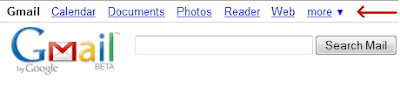
The best part, you don't need to do this setting for Calendar, Docs, Photos etc if you use the top navigation bar as shown below.

This setting is "HIGHLY RECOMMENDED" . (bold, underlined & italicised :) )
Happy Safe Browsing...

6 comments Saturday, July 12, 2008

New feature from google allows you to monitor and control login activity. Now you can see from where all you (or someone else) logged in and which IPs are online at this moment

You migh have accessed gmail from a cybercafe or a public internet terminal and forgot to log out. Now you can do a remote logout also.
“With this information, I can quickly verify that all the Gmail activity was indeed mine,” a Gmail developer at the official Gmail blog writes.

UPDATE: To know more about the IP from where your account was used, use IP2Locations tools such as http://rohit11.com/tools/ip/

1 comments Sunday, June 29, 2008


Few days ago an interesting attempt to phish for Google account credentials made it to my friend's inbox. As you may know, phishing emails are sent out by abusers to make the recipient in some way reply with their password or click through to enter their password, but the more official looking they are, the more easily they’re believed. This particular mail, shown in the screenshot, had the following attributes:


  • It was sent by “customer care”. OK, could be a lie.


  • It got his name right... might be just luck, as his name is included in his mail address.


  • It was sent with a layout that looked very official, and it even had an actual event from his calendar listed in the information (grayed out in the screenshot in the top right). Now this one was a bit more peculiar, because who else but Google would know his private calendar events?


The subject of the mail read “[Invitation] VERIFY YOUR ACCOUNT”, and the main content included this bit:


User Name, you are invited to VERIFY YOUR ACCOUNT (...)This Email is from Gmail Customer Care and we are sending it to every Gmail Email User Accounts Owner for safety. we are having congestions due to the anonymous registration of Gmail accounts so we are shutting down some Gmail accounts and your account was among those to be deleted.
We are sending you this email to so that you can verify and let us know if you still want to use this account. (...)You will have to confirm your E-mail by filling out your Login Information below after clicking the reply button, or your account will be suspended within 24 hours for security reasons.
* Username:
* Password:


It’s quite obvious Google’s not likely to send out such mails for real. You might have guessed by now how this was done, though: someone apparently set up a Google account with the first name “customer” and the surname “care” (the actual email address was customerservices[some-number]@googlemail.com). They then created an event in their calendar titled “VERIFY YOUR ACCOUNT” – instead of say, “Party Tonight” – with the event description being the text printed above! Finally, they added him as guest to that event, which caused Google to prepare and send the event invitation mail!


If you too ever receive a mail like this, here’s something you can do instead of actually replying: click the blue arrow to the top right of the Gmail message and pick “Report phishing”. A dialog will pop up explaining what phishing is, and it then says: “If you believe this message is a phishing attack, you can report it to our abuse team and help us thwart this attack and others like it.” Google notes though, “Reporting this message as an attack will send the entire message to our team for review.”


Be a safe netizen, REMEMBER:


  • Never ever give out your password on internet


  • Don't click any random link sent to you in emails


  • No provider will EVER delete your account if you do not send them any mail or verification


  • Report phishing if you get any such mail asking for password of orkut, yahoo or any other site.

0 comments Saturday, September 29, 2007

We all noticed a lot of noise on the CSRF attack recently unearthed in Gmail which is really dangerous & can cause harm to many other websites also. [1] [2]

So the question arises, What to do to be SAFE?
Here are few alternatives, select one as per your convenience.

1) POP your mails: I'll again emphasis on POPing the mail over SSL, this way you are not logging on the webmail so you are safe from such attacks, moreover you are on a complete encrypted channel, so more safer

2) Use multiple browsers: Try using different browser for different activities. Say using IE for logging onto webmails & such sites, Firefox for non-login websites, Opera for another such set. No kidding, this is a good way to keep yourself secure

3) Use multiple profiles: If you are die-hard fan of any browser & want to use only that, try creating different profile (if it supports) & fire up the browsers in these profiles. Say "Default" profile for general browsing & "Safe" profile for webmails & other accesses where you use your passwords. You can even secure this "Safe" profile by disabling javascripts & active components like Flash, Java applet, ActiveX etc.


Practise some secure tips to be safe on internet
Safe surfing :)

[1] http://www.gnucitizen.org/blog/google-gmail-e-mail-hijack-technique/
[2] http://www.rohasnagpal.com/blog/2007/09/27/can-your-gmail-account-really-be-hacked/

0 comments Tuesday, July 10, 2007

[The Policy I follow]

This policy outlines how I try to handle responsible disclosure of a vulnerability
to the product vendors, security vendors and the general public.


Step 1: Vulnerability detected

Step 2: Inform the vendor of the product or the servce formally through email to following mail accounts/aliases
security@VENDOR,
support@VENDOR,
info@VENDOR,
secure@VENDOR,
admin@VENDOR,
sysadmin@VENDOR

Step 3: Wait for vendor's acknowledgement for 5 working days

Step 4: If the vendor fails to acknowledge initial notification within 5 working days, I contact the vendor for second time using mail & other publicly available contact medium such as phone or fax

Step 5: If a vendor response is received within the timeframe we (vendor & me) wait for a reasonable period of time to develop a fix. I make every effort to work with vendors to ensure that they get the technical details and severity of the flaw detected.

Step 6: Once the patch is ready & released with responsible timeframe, in consent with the vendor I will formally and publicly release its security advisories on selected security mailing lists & other forums.

Consent of the vendor for discloser is important as few vendors do not like to get their vulnerability publicized as it may effect their reputation. Respecting their feelings I get the consent from the vendor & then publicize the flaw

0 comments Thursday, May 03, 2007

Yes you read it right - No steganography software

So here is a quick howto on doing image steganography with common tools, no specialized software.

1: Compress the file you want to secure( I tried both rar & zip), say secure.zip
2: Take the image file which you want to use, say image.jpg
3: run the following command
copy /b image.jpg + secure.zip hidden.jpg
4: Double click hidden.jpg & you'll see the original image
5: Open the file in archiving utility (I tried winzip & winrar)
6: It will open the content of original secure.zip

Analysis
copy commands copies the content of both the files into a third file
The third file starts with the header of an image & even the extension is of image, so the OS (tried KDE & GNOME in case of Linux) interprets it like an image & shows the image, that too without any distortion or noise in the image.

/b option indicates binary operation & takes care of any possible goofup.

PoC
Image on left is the original image & where as one on the right is with hidden content, try opening it in any archiving software.

0 comments Wednesday, April 25, 2007

I just got my office scanned for software inventory using a tool called belarc advisor.While going through reports I wondered how easy it can be for anyone to get license key of any software using belark report & google

Just try this search & you'll get to know by yourself

http://www.google.com/search?hl=en&q=intitle%3A%E2%80%9DBelarc+Advisor+Current+Profile%E2%80%9D


Scary, very scary...