2 comments Thursday, October 30, 2008

Working on windows XP I have faced this problem a hunder times. While copying files from one folder to another where the some of the file already exists we see this "Confirm file replace" dialog box.At times when there are many duplicate files, it feels stupid to keep clicking "No" or pressing "N" on keyboard. If Microsoft can keep a "Yes to all" button, why can't they keep a "No to all".


OK, here's the solution. Simply press and hold "Shift" key and then click on "No" button. Bang!
This combination works as "No to all".

Happy Copy/Paste :)

3 comments Wednesday, October 29, 2008

Google announced so called OpenID launch which scared me again about OpenID
I'm not totally against OpenID concept, I'm just paranoid about it at this stage.

Here's my take on

1 comments Sunday, October 19, 2008

Hey Friends,
I'm back online after a small pause of 10-15 days. I wished I could have gone offline like Tarun, Moksh , Harsha and many others who take a break, disconnect themselves from computer/Internet world and enjoy their non-digital life. But this pause of mine was little different.

I was not away from my laptop or Internet or cellphone or computer industry but I was still offline tied up in something very different. So busy that was not in a position to twit also, my last twit was on 4th of October :)
As the Director Technology of Commonwealth Youth Games Pune 2008, I was juggling with a lot of stuff and was busy managing a very different technology. Soon I'll be posting some details about this games time technology.


Though I live in Pune, but I spent my last 15 days in a hotel near the stadium, no time to go home :(. As of now blogging from the hotel only and will be checking out today.

I apologize from all my friends who tried to contact me and I was not in a situation to give proper time to them, I apologize for missing some big things in between which includes book launch of Preeti, wedding of a close friend, anniversary of a friend, 2 birthdays, a barcamp and a lot of personal stuff (meeting prospects, you know which kind of prospects).

Thanks to all for understanding and thanks to all who sent me SMS wishes during the games, my friends are great.

AND now its time to do the wrapup of the games and prepare for ClubHack08. Life will be little busy again, but lets keep in touch.

0 comments Thursday, September 18, 2008

Now this is cool!
I use this hosting provider called "dreamhost" which gives a lot of webspace and bandwidth. When I signed up few years back I got some 200gb space and a few TB bandwidth which is increasing weekly like your gmail account space and now my account is above 600gb and >6TB in bandwidth :) .

Now this company has turned 11 and offered UNLIMITED space for new signups.
Along with that they offer existing customers to create promo code and offer extra discount to new signups.
So I created a promo code "plus50" which will give you $50 flat discount on any hosting plan you buy from dreamhost.

I loved this hosting company for few things
# Wonderful support.
# Out of the league working style.
# Friendly team
# They give you free SSH accounts so power users can do a lot more
# I haven't faced any downtime, so for me its ZERO downtime
# One can host unlimited domains on this space, no limitation. I host some 80+ domain on this
# Unlimited: space, bandwidth, email, domains, mysql, SSH account.
# One click install of: joomla, wordpress, mediawiki, phpbb, zencart and many more.

So if you are interested in buying a LOT of space for yourself online, go ahead and act fast to enjoy this unlimited offer. Use promo code plus50 to get extra $50 discount.

4 comments Wednesday, September 17, 2008

Ok! Have been hearing a lot of noise about wifi connection getting attacked and misused. So thought of writting a small howto for securing home wifi device.


Steps:

  • # Open the configuration of your home wifi device. Generally its done by opening the IP address of your wireless router in the browser
  • # Login to this configuration page and go to device setting
  • # Change the defaul password of this device, i need not tell you what is called as strong password
  • # Go to wireless setting or wireless security setting
  • # Select WPA (or WPA-PSK, WPA-Personal, depending on your device model)
  • # Put a strong password here too.
  • # Done

Remember, one should NOT use "WEP" or "OPEN" configuration

Example screenshots to help you

Linksys

Netgear

Zyxel

Obviously this is not 100% security because nothing is 100% secure, But this will surely secure your home wifi from 80% of the attacks.

3 comments Monday, September 01, 2008

Google announced the launch of its new browser called chrome. It will be launched in US on tuesday, thats end of the day today.

Glimps of the product was released via comic (which I think is a nice way to communicate).
BTW this comic was created by Scott McCloud of classic Understanding Comics fame.


Product Homepage: http://gears.google.com/chrome/ (speculated)
UPDATE: Insider information says product homepage will be www.google.com/chrome once released

Will this browser kill Firefox: Not possible
Will this browser kill IE: Might not, thats the default browser in the most popular and "default" OS
Will this browser kill opera etc: Time will tell.
Let's wait and watch how good/bad is this new browser.

0 comments Wednesday, August 27, 2008

In Fyodor’s talk at Blackhat he talked about the research he’s been doing, and the ways that research has helped him to improve Nmap with lot many enhancements. Let's have a look at the most interesting one.

Abstract:

One of Fyodor’s main focuses was improving Nmap’s speed through improved
efficiency. One of the best ways to do this is to allow for scans of fewer
ports, but this requires that you choose those ports carefully so as to miss as
little as possible. So what he did, through trial and error and tons of scans,
was figure out the most frequently open ports on the Internet.

Here they are for each protocol:

TCP

  1. 80
  2. 23
  3. 22
  4. 443
  5. 3389
  6. 445
  7. 139
  8. 21
  9. 135
  10. 25

UDP

  1. 137
  2. 161
  3. 1434
  4. 123
  5. 138
  6. 445
  7. 135
  8. 67
  9. 139
  10. 53

Ok, so now that we know what the top 10 ports are, wouldn’t it be cool to be
able to scan based on them? And what if we wanted to scan the top 50? Or the top
100?


Fyodor has built this in with the --top-ports option. It’s
wicked nice, and you invoke it like this:

nmap –top-ports 100 $target

And of course, 100 is just an arbitrary number, so you could just as easily
do this:

nmap –top-ports 3000 $target

As you increase this number you obviously gain more and more accuracy, but
because the ports are organized according to the most commonly found on the
Internet, you can scan relatively few and still have good chances of finding
everything open.


Stats from his presentation on TCP port efficiency using --top-ports:

–top-ports 10: 48%
–top-ports 50: 65%
–top-ports 100: 73%
–top-ports 250: 83%
–top-ports 500: 89%
–top-ports 1000: 93%
–top-ports 2000: 96%
–top-ports 3764: 100%

This means for just curiosity scans I can go with --top-ports
1000
and get roughly 93% accuracy in a fraction of the time.

read about more options here.


3 comments Tuesday, August 26, 2008

As promised in http://twitter.com/rohit11/statuses/895182069 here is the report of my flight experience from Delhi to Jaipur.

The day started nicely where my driver brought me from Connaught place to airport in flat 14 minutes. Though the roads were clear at 6 in the morning, but still 14 minutes is too less for this distance. It was fun.

I reached airport, and after all the formalities and waiting we started boarding. The bus at the boarding gate took us to a deserted bay where only small planes, helicopters and airforce cargo planes were standing.

There we got to know that we are about to fly in an ATR-42-320 50 seater plane. Its not that I haven't flew in an ATR but this was a bit scary. The first glimpse of it made me feel that I’m going for skydiving or an air force exercise. It was due to the look of front gate also with that strappy net guard.
Here is a view from my window the flight standing next is a similar one (ATR-42-320)
And this is the strappy net thing which made me feel like skydiving. And yes thats the elder aunt standing outside the cockpit.

When I grabbed my seat I noticed that the hook of table tray is broken the tray is fixed like this under the seat cover. This reminded me of the movie "final destination" :(. Even the news paper kept in the seat pocket was 2 days old.


When I looked out at the fan on both the side, I noticed the right fan was revolving faster than the left one. First I thought it’s just my fear. But later it turned out to be an actual problem (maybe)
I saw this girl standing outside when we were boarding but later on she turned out to be some instructor or ground crew member without a uniform or proper props. She was signaling the pilot to start and take a turn as if she was signaling a truck and guiding the parking of it.

Anyway we reached the runway and were about to start the taxi when the pilot announced that due to some technical problem they are returning to the bay. Now this added to my scare. Pilot explained that they are seeing some warning signal for the left fan (see I was right) and they are going to check whether it’s an issue or just a false alarm.

When we reached the bay, this truck sign babe turned out to be some flight engineer or whatever. She came in, checked the status and went out. And we started our way back to runway without a word from the pilot. Fan speed was still uneven. Now along with me other co-passengers were scared and someone yelled to know the status. The pilot said that the situation is "under control" and we are going to take off now.

All my life when airhostess gives those safety instructions on emergency landing on water etc, I always thought when I'll get a chance to do that. But this time I was not at all in that mood. Here during the safety instruction the elderly aunt (hostess) said that we don't have automated oxygen support system, if anyone need it kindly contact us. I suppose they had spare oxygen cylinders :((

Anyway in the second time we were able take off from ground. I was still very much scared. The complete process made us one hour late than scheduled time. The whole journey we were flying in low altitude but that I suppose is dependant on the model of plane. That was good because we were able to see a lot of stuff down.
Then came the time on serving breakfast, the elderly aunt brought a basket of muffin and puffs. It was served in just a tissue paper, no plates, and no condiments nothing. And then water was served. The first thing I did in this case was checking the seal of bottle and packing date. Atleast that was all ok.

In the midair, a slightest of turbulence sent a shiver down my spine.

Anyway the flying time was just 50 minutes and we somehow landed at Jaipur airport.
LAND Ho!!!!
Don't ask me about the feeling when I landed my foot on earth. It was like completing an adventure sport with only scare and no fun. This was my flight, I clicked it with happiness of landing safely at Jaipur
Day before of my flight, one of my friend suggested me not to take a flight to Jaipur as the driving time is only 3 hours with wonderful roads, but I had already booked so ignored her suggestion. In the flight I was thinking, why I ignored her. I should have taken the road route, in any case it took me same time in the flight too.

2 comments Monday, August 11, 2008

Its been reported that some of the Olympic opening ceremoney fireworks were faked.
China is accused of faking it!!!! Why am I not surprised?????


Source:
http://sports.yahoo.com/olympics/beijing/blog/fourth_place_medal/post/Some-Opening-Ceremony-fireworks-were-faked?urn=oly,99745


If you watched the Opening Ceremony on Friday night, chances are you said
something like, "no way that's possible" at least once. It turns out you were
right.
The faked fireworks were actually set-off at the stadium, but because of
potential dangers in filming the display live from a helicopter, viewers at home
were shown a pre-recorded, computer-generated shot. It sounds dishonest, but I'm
not sure it's such a terrible thing.


http://news.sky.com/skynews/Home/World-News/Beijing-Olympics-Opening-Ceremony-Faked-Firework-Footprints-Added-For-TV/Article/200808215075291?lpos=World%2BNews_3&lid=ARTICLE_15075291_Beijing%2BOlympics%2BOpening%2BCeremony%2BFaked%3A%2BFirework%2BFootprints%2BAdded%2BFor%2BTV


The dupe was revealed by China's Beijing Times. Speaking to the paper, the
man responsible for the animation said he was pleased with the result.
"Seeing how it worked out, it was still a bit too bright compared to
the actual fireworks," Gao Xiaolong told the newspaper.
"But most of the audience thought it was filmed live - so that was mission accomplished."


Now something more interesting, there was a BLUE-SCREEN-OF-DEATH popularly known as BSOD.

This was at the moment when Li Ning was rounding the lip of the Bird's Nest during the amazing torch-lighting climax.
Even I noticed it on my television screen ;)

Source:
http://rivercoolcool.spaces.live.com/blog/cns!D6F05428A2B8CB48!1570.entry
http://gizmodo.com/5035456/blue-screen-of-death-strikes-birds-nest-during-opening-ceremonies-torch-lighting

4 comments Saturday, August 09, 2008

Here's a quick HOWTO on setting up your static website on Google AppEngine.
I promise to keep it very simple and easy to understand for my non-geeky friends

Registering an application:
Firstly register an application on Google AppEngine. It doesn’t matter what you call it, for this HOWTO lets name it mysamplesite.
You’ll need a regular gmail account to do this, hope you already have that (if not shame on you ;)).

Creating a local site and configuration file:
Create a local folder on your machine to for this project. Put a folder inside that containing all your web pages. It can be called anything, but the AppEngine examples always call it static. For our HOWTO lets call it home

Say if your project folder is at C:\MyWeb then this folder will be C:\MyWeb\home, and the main home page would probably be C:\MyWeb\home\index.html.
So now you have a local folder on your machine @ C:\MyWeb\home which holds your website.

Now create a text file called app.yaml in the project folder (C:\MyWeb\app.yaml) with the following contents (I hope you know that you have to change the mysamplesite entry to the name you registered):

application: mysamplesite
version: 1
runtime: python
api_version: 1
handlers:

- url: (.*)/
static_files: home\1/index.html
upload:
home/index.html

- url: /
static_dir: home

Creating the environment for upload:
The website and all related configuration is now ready for upload. Now you need to set up the enviroment for it. Don't worry I'll not ask you to do any coding, its simple "next-> next" kind of installation

# Download and install python from http://www.python.org/download/ and install it. (Simple "next->next" installation)
# Download and install Google AppEngine SDK from http://code.google.com/appengine/downloads.html (Nothing
to worry I promise)


Uploading the website:
Now its the time to upload your static website. All you have to do is run the following command from command prompt.
appcfg.py update C:\MyWeb

This will ask you for your email address. Enter the one you used for creation of application. Next it will ask for your gmail password, don't worry & type it too.
It will show some text and screen & BANG! your static website is up and running on Google AppEngine.

Now you can access your website by the url http://mysamplesite.appspot.com/ (change mysamplesite to your project name).

Explanation of app.yaml file:
The second handler specification (for url: /, handled by static_dir: home) means that AppEngine will serve the page home\folder\abc.xyz whenever a user requests http://mysamplesite.appspot.com/folder/abc.xyz. That’s 95% of a static web site. And the first handler specification (for url: (.*)/) says that any request to a URL ending with a slash should return the index.html page in that folder. So a request to http://mysamplesite.appspot.com/folder/ would return the file home\folder\index.html.

Changing the site name to your website name:
Obviously you don't want to show the world your website as mysamplesite.appspot.com. So now lets change the URL to your website name.
For this you need to have a Google Apps hosted domain. If you already haven't done that, go for it cause it will give you the following for free
a) email server: multiple email address with @yourdomain.com
b) Google docs
c) Calendar
d) Google talk
and much more... and all by your domain name.

Once you have the Google Apps account, go to https://www.google.com/a/cpanel/YOURDOMAIN.COM/SelectServices and enter your AppID (mysamplesite in our example)
Accept the terms and condition and create a name for your project.
Next you'll be asked to create a CNAME entry in your DNS. If you are new to this, read the documentation on the page and you'll be able to do it. Its not a rocket science anyway.
Once done you can access your new static website hosted on Google AppEngine by your own domain name.

That's easy, isn't it.

Benefits of site on Google AppEngine:
a) High end google servers
b) No worries of downtime
c) High availablity
d) No pain of maintaining the server settings if you have only static website
e) FREE !!! This can make your complete web presence for free. Blog @ Blogspot, Album @ Picasa, Website @ AppEngine, mail @ gmail ( or hosted google mail), presentations and files @ Docs. All you need to pay is cost of domain name(~$10).

3 comments Thursday, August 07, 2008

Many of you might have used Google docs and spreadsheet, but have you ever tried this "magic" trick ;)


Ok, open up a spreadsheet and enter "Google" in the top left cell, and enter "Yahoo" in the cell below. Now select both the cells you created. Hold down the Ctrl key, and drag the bottom right corner of the selection downwards over the other cells. See the fun when you release the key/mouse


A sample screenshot


You can try any combinations and have fun

Try combinations like:

a) file, edit....
b) batman, superman....
c) olympics, asian games....
d) abhishek, amitabh...
e) tom cruise, brad pitt...

Q: What's happening here?
A: Well, thats from a member of Google Labs called Google Sets. One of the oldest member of labs and still listed. This tool automatically expands a given set of items. And which is being used for fun/productivity in spreadsheet :)

Tell me if you find some more interesting sets of keywords

4 comments Friday, July 25, 2008

Imagine a company with almost 20000 employees…
… with 1 billion customers
… created from scratch in less than 3 years
… operating for just a few weeks

1000s journalists are in town…
…to capture the scoop
…successes and failures

With more than 200 people…
… to roll out the entire IT infrastructure of the “company”
… to issue passport-grade badges to all 20000 “employees”
… Then to manage the IT operations for 2 weeks
… and then undo it all…


Guess which company is this???

0 comments Thursday, July 24, 2008

On 24th July 2008, Google rolled out an option which you can use to force your communication with Gmail server over secure channel (read HTTPS).

If you go to the Settings and select "always use https", Gmail will automatically redirect to the secure version. Until now, you had to manually type https://mail.google.com/ in the address bar or bookmark the address.

As per Google

"If you sign in to Gmail via a non-secure Internet connection, like a public
wireless or non-encrypted network, your Google account may be more vulnerable to
hijacking. Non-secure networks make it easier for someone to impersonate you and
gain full access to your Google account, including any sensitive data it may
contain like bank statements or online log-in credentials. We recommend
selecting the 'Always use https' option in Gmail any time your network may be
non-secure,"

"We use https to protect your password every time you log into Gmail, but we
don't use https once you're in your mail unless you ask for it (by visiting
https://mail.google.com rather than http://mail.google.com). Why not? Because
the downside is that https can make your mail slower. Your computer has to do
extra work to decrypt all that data, and encrypted data doesn't travel across
the Internet as efficiently as unencrypted data,"

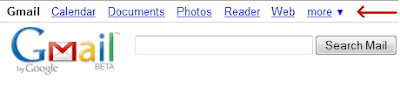
The best part, you don't need to do this setting for Calendar, Docs, Photos etc if you use the top navigation bar as shown below.

This setting is "HIGHLY RECOMMENDED" . (bold, underlined & italicised :) )
Happy Safe Browsing...

0 comments Sunday, July 13, 2008

Let's play soccer

6 comments Saturday, July 12, 2008

New feature from google allows you to monitor and control login activity. Now you can see from where all you (or someone else) logged in and which IPs are online at this moment

You migh have accessed gmail from a cybercafe or a public internet terminal and forgot to log out. Now you can do a remote logout also.
“With this information, I can quickly verify that all the Gmail activity was indeed mine,” a Gmail developer at the official Gmail blog writes.

UPDATE: To know more about the IP from where your account was used, use IP2Locations tools such as http://rohit11.com/tools/ip/